The problem hiding in our search
Episode 3 ended on a high: ask “how do I get my money back?” and the refund policy comes back as the top match. Retrieval works.
But look closely at what search.php actually does:
$rows = db()->query('SELECT source, content, embedding FROM chunks')->fetchAll();
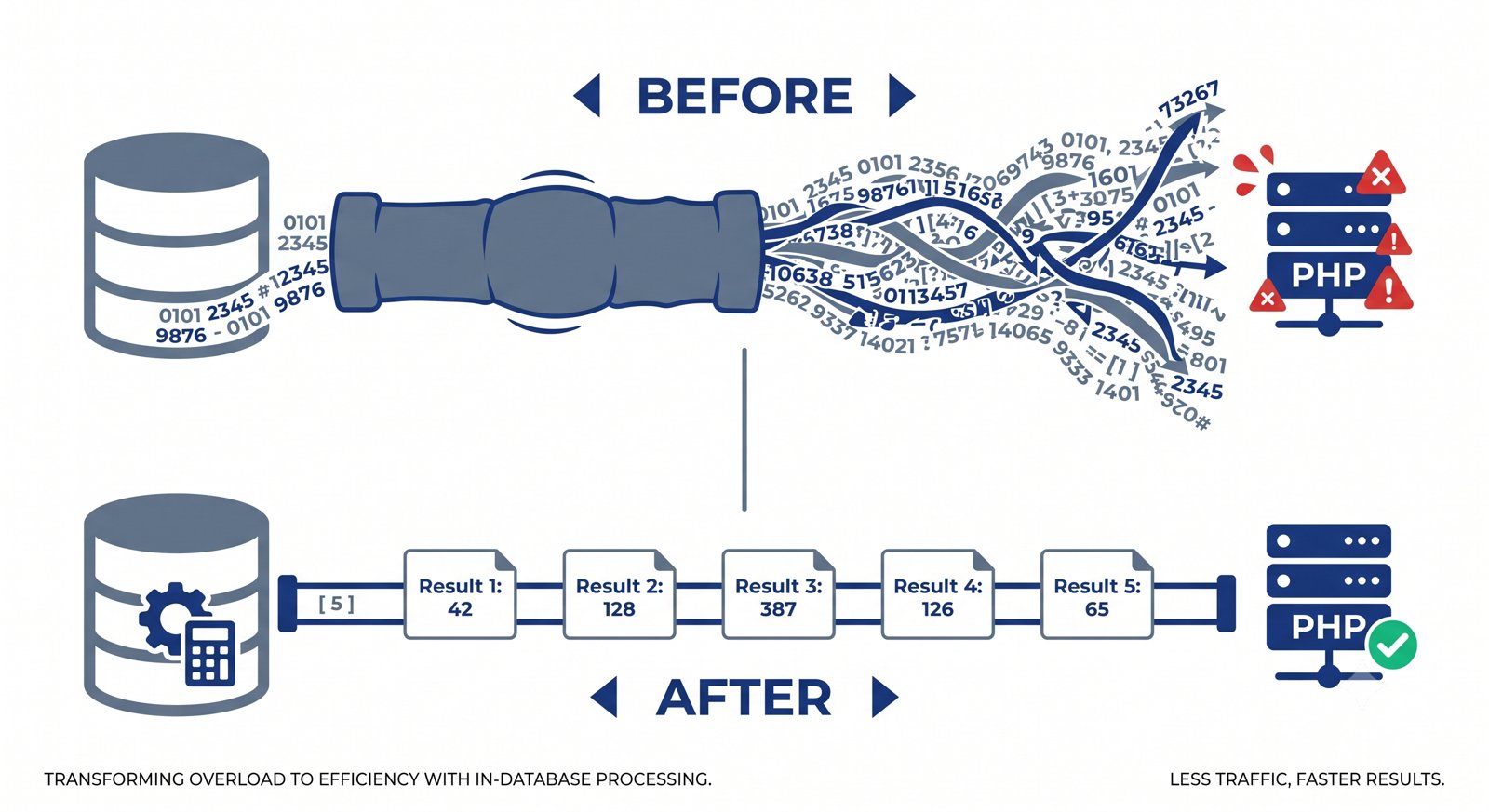
That line says: “give me every single chunk and every one of its 1,536 numbers.” Then PHP decodes all that JSON and loops over it, doing the math itself.
With our 18 chunks, that’s instant. Now imagine Nimbus grows and the knowledge base hits 50,000 chunks. Each embedding is roughly 20–30 KB as JSON text, so every single question would:
- Drag over a gigabyte of numbers from MySQL to PHP, across the network,
- Decode 50,000 JSON arrays into PHP memory (likely blowing your memory limit), and
- Loop through 76 million floating-point multiplications — in PHP, which is not built for that.
Your customer waits. And this happens on every question. We built the right idea with the wrong plumbing.
The fix is a principle worth memorizing: move the computation to the data, not the data to the computation. MySQL is already sitting on those numbers. Let it do the math and send back only the handful of rows we actually want.
Teaching MySQL to do vector math
MySQL 8 has no built-in “compare two vectors” function. But it does have a way to read JSON arrays as if they were table rows: JSON_TABLE. That’s the key that unlocks everything.
💡 New tool —
JSON_TABLE: A MySQL 8 feature that converts a JSON array into rows you can query with normal SQL. Give it[0.12, -0.44, 0.87]and it hands you back a little 3-row table. Once our vectors are rows, computing a dot product is justSUM()— something databases are extremely good at.✅ Everything in this episode runs on plain MySQL 8.
JSON_TABLE(8.0.4+) and stored functions are standard MySQL 8 features — no upgrade, no plugins, no extensions, no cloud service required. If you can runSELECT VERSION();and see 8.0, you’re fully equipped for this entire series.
Here’s the plan: turn both vectors into rows, line them up position-by-position (element 1 with element 1, element 2 with element 2…), multiply each pair, and sum the results. That’s cosine similarity, expressed in SQL.
We’ll wrap it in a stored function — a reusable function that lives inside the database:
DELIMITER //

CREATE FUNCTION cosine_sim(a JSON, b JSON)
RETURNS DOUBLE
DETERMINISTIC
BEGIN
    DECLARE result DOUBLE;

    SELECT SUM(x.v * y.v) /
           (SQRT(SUM(x.v * x.v)) * SQRT(SUM(y.v * y.v)))
      INTO result
      FROM JSON_TABLE(a, '$[*]'
             COLUMNS (i FOR ORDINALITY, v DOUBLE PATH '$')) AS x
      JOIN JSON_TABLE(b, '$[*]'
             COLUMNS (i FOR ORDINALITY, v DOUBLE PATH '$')) AS y
        ON x.i = y.i;

    RETURN result;
END //

DELIMITER ;
Read it piece by piece:
JSON_TABLE(a, '$[*]' …)unpacks vectorainto rows.FOR ORDINALITYnumbers each row (1, 2, 3…) so we know each number’s position.- The
JOIN … ON x.i = y.ipairs up matching positions from both vectors. SUM(x.v * y.v)is the dot product; dividing by the two square roots is the exact cosine similarity formula from Episode 3 — the same math, now running where the data lives.
⚠️ Gotcha:
DELIMITER //isn’t part of the function — it temporarily tells your MySQL client “don’t treat;as the end of my command,” since the function body contains semicolons. Set it back withDELIMITER ;afterward. If your client complains about creating functions, you may needSET GLOBAL log_bin_trust_function_creators = 1;.
A free speed-up: normalize once, multiply forever
Look at that formula again. Every single query recomputes SQRT(SUM(x.v * x.v)) — the length of each stored vector. But those vectors never change after we save them. We’re doing the same arithmetic over and over for no reason.
The trick is normalization: scale every vector to length 1 before storing it. Once both vectors have length 1, the division does nothing (you’re dividing by 1 × 1), and cosine similarity collapses into a plain dot product — just multiply and sum.
💡 What “normalizing” means: Picture each vector as an arrow. Normalizing keeps the arrow pointing in exactly the same direction but shrinks or stretches it to a standard length of 1. Since cosine similarity only ever cared about direction (the angle), nothing is lost — we’ve simply thrown away information we were ignoring anyway.
Add this to your PHP:
<?php
// vector.php — scale a vector to length 1
function normalize(array $vec): array {
    $sum = 0.0;
    foreach ($vec as $v) {
        $sum += $v * $v;
    }
    $length = sqrt($sum);
    if ($length == 0.0) {
        return $vec; // avoid dividing by zero
    }
    return array_map(fn($v) => $v / $length, $vec);
}
And a leaner SQL function to match:
DELIMITER //

CREATE FUNCTION dot_product(a JSON, b JSON)
RETURNS DOUBLE
DETERMINISTIC
BEGIN
    DECLARE result DOUBLE;

    SELECT SUM(x.v * y.v)
      INTO result
      FROM JSON_TABLE(a, '$[*]'
             COLUMNS (i FOR ORDINALITY, v DOUBLE PATH '$')) AS x
      JOIN JSON_TABLE(b, '$[*]'
             COLUMNS (i FOR ORDINALITY, v DOUBLE PATH '$')) AS y
        ON x.i = y.i;

    RETURN result;
END //

DELIMITER ;
Same rankings, meaningfully less work per query.

Updating the schema and the code
Schema with metadata
While we’re here, let’s give the table proper metadata columns and indexes. Metadata is what powers filtering (“only search the refund docs”) and citations later.
USE nimbus;

ALTER TABLE chunks
    ADD COLUMN doc_type VARCHAR(50) NULL AFTER title,
    ADD INDEX idx_source (source),
    ADD INDEX idx_doc_type (doc_type);
⚠️ An index does NOT speed up vector search. Indexes work by sorting values so the database can skip rows — but “closeness in meaning” isn’t something you can pre-sort. These indexes speed up filtering by
sourceordoc_type, which is genuinely useful. The similarity scan itself still checks every remaining row. We’ll come back to why that matters.
Storing normalized vectors
One line changes in build-index.php — normalize before saving:
require __DIR__ . '/vector.php';

// …inside the loop…
$embedding = normalize(getEmbedding($c['content']));   // ← normalized now

$stmt->execute([
    $c['source'],
    $c['title'],
    $c['chunk_index'],
    $c['content'],
    json_encode($embedding),
]);
The new search
Now the good part. search.php no longer downloads anything it doesn’t need — MySQL ranks and returns just the top matches:
<?php
// search.php — let MySQL do the ranking
require __DIR__ . '/db.php';
require __DIR__ . '/embed.php';
require __DIR__ . '/vector.php';

$question = $argv[1] ?? 'How do I get my money back?';
$topK     = 3;

// Normalize the question vector too — both sides must match
$queryVec = normalize(getEmbedding($question));

$sql = 'SELECT source, title, content,
               dot_product(embedding, CAST(:qvec AS JSON)) AS score
          FROM chunks
      ORDER BY score DESC
         LIMIT :k';

$stmt = db()->prepare($sql);
$stmt->bindValue(':qvec', json_encode($queryVec));
$stmt->bindValue(':k', $topK, PDO::PARAM_INT);
$stmt->execute();

echo "Question: $question\n\n";
foreach ($stmt->fetchAll() as $i => $row) {
    printf("#%d  score=%.3f  [%s]\n%s\n\n",
        $i + 1,
        $row['score'],
        $row['source'],
        mb_substr($row['content'], 0, 160) . '…'
    );
}
⚠️ Gotcha: For
LIMIT :kto bind correctly as a number, PDO must not be emulating prepared statements. Add this to your PDO options indb.php:
php

PDO::ATTR_EMULATE_PREPARES => false,
Run it exactly as before:
php episode-04/search.php "How do I get my money back?"
Identical results to Episode 3 — but now three rows cross the wire instead of the entire knowledge base. Point this at 50,000 chunks and it keeps working, where the old version would fall over.
Filtering with metadata
Because we kept metadata columns, scoped searches are now trivial — and the index makes the filter fast:
SELECT source, content,
       dot_product(embedding, CAST(? AS JSON)) AS score
  FROM chunks
 WHERE doc_type = 'policy'          -- only search policy documents
 ORDER BY score DESC
 LIMIT 3;
This gets genuinely powerful later: search only a customer’s language, only current-version docs, only public articles.
Design spotlight: where this approach runs out of road
Time for an honest reckoning, because tutorials rarely give you one.
What we built is a full scan: MySQL still computes a score for every row that survives your WHERE filter. We removed the network transfer and the slow PHP loop — a huge win — but not the fundamental “check everything” cost.
Practical guidance:
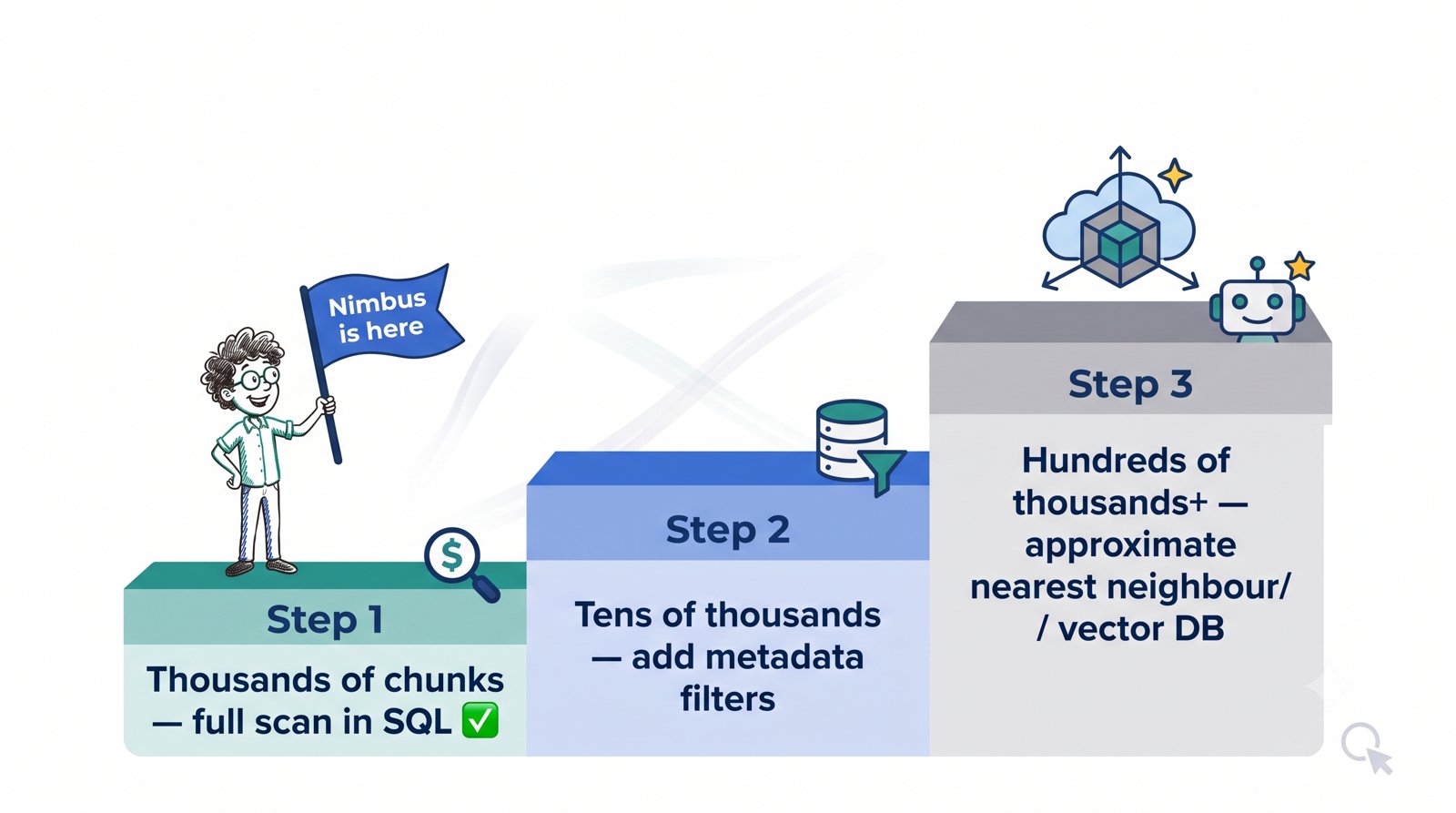
- Up to a few thousand chunks: excellent. Fast, simple, zero extra infrastructure. This covers most company knowledge bases, including Nimbus.
- Tens of thousands: still workable, especially with metadata filters narrowing the field first. Watch your query times.
- Hundreds of thousands or more: you need approximate nearest neighbour (ANN) search — clever indexes that find almost the best matches while checking only a small fraction of rows. That’s the point where a dedicated vector database (or a MySQL/PostgreSQL extension built for it) earns its keep.
The engineering lesson: don’t reach for heavy infrastructure before your data demands it. A JSON column and a stored function will carry a real support bot a remarkably long way.
“Shouldn’t I just upgrade to MySQL 9?”
Short answer: no, and you’re not missing out.
MySQL 9 did add a native VECTOR data type. But the DISTANCE() function — the one that actually compares two vectors — ships only with HeatWave MySQL on Oracle Cloud, not with MySQL Community or Commercial. So even on MySQL 9 you’d get a tidier place to store vectors and still no built-in way to search them. You’d be writing the same stored function we just wrote.
Since MySQL 8 is what’s installed nearly everywhere — shared hosting, cPanel, most company servers, most Docker images — building on it isn’t a compromise. The approach in this episode is the one that actually works on the database you already have, and it won’t be obsoleted by an upgrade.
Try it yourself
- Prove the speed difference. Wrap both versions in timing code —
$start = microtime(true);before, andecho microtime(true) - $start;after. With 18 chunks the gap is small; duplicate your chunks a few thousand times with a SQLINSERT … SELECTand run it again. The gap becomes dramatic. - Confirm nothing broke. Run the same three questions from Episode 3. Scores should be effectively identical — you optimized how it computes, not what it computes.
- Try a filtered search. Tag a few rows with
doc_type = 'policy', then run a search restricted to policies. Notice how filtering first shrinks the work the scan has to do.
Recap & what’s next
- Pulling every embedding into PHP doesn’t scale — it moves huge amounts of data across the network and does slow math in the wrong place.
JSON_TABLElets MySQL read JSON arrays as rows, so we can express cosine similarity as a stored function and let the database rank rows.- Normalizing vectors to length 1 at write time turns cosine similarity into a simple dot product — same rankings, less work per query.
- Metadata columns and indexes speed up filtering, not the similarity scan itself.
- This full-scan approach comfortably handles thousands of chunks; beyond that you’d move to approximate search.
- Everything here runs on stock MySQL 8 — no upgrade needed. MySQL 9 adds a
VECTORtype but still can’t compare vectors outside HeatWave, so this remains the right approach.
Our retrieval is now fast and honest, but it’s still crude: we always grab the top 3 chunks, no matter how bad those matches are. Ask the bot about the weather and it will confidently hand back three irrelevant refund passages. In Episode 5 — Retrieval: Top-K, Thresholds & Filtering, we’ll turn raw search into real retrieval — choosing how many chunks to return, setting a minimum quality bar so weak matches get discarded, and building the clean retrieve() function that Episode 6’s answer generation will sit on top of.
Reference: MySQL 9.x Vector Functions documentation — note the availability restriction on DISTANCE().