The problem, in one support ticket
Imagine a customer opens a chat on Nimbus’s website and types:
“I was charged twice this month. Can I get a refund?”
You’d love an AI to answer this instantly. So you wire up an LLM, pass the question straight through, and it replies with a confident, well-written paragraph about Nimbus’s 30-day refund policy.
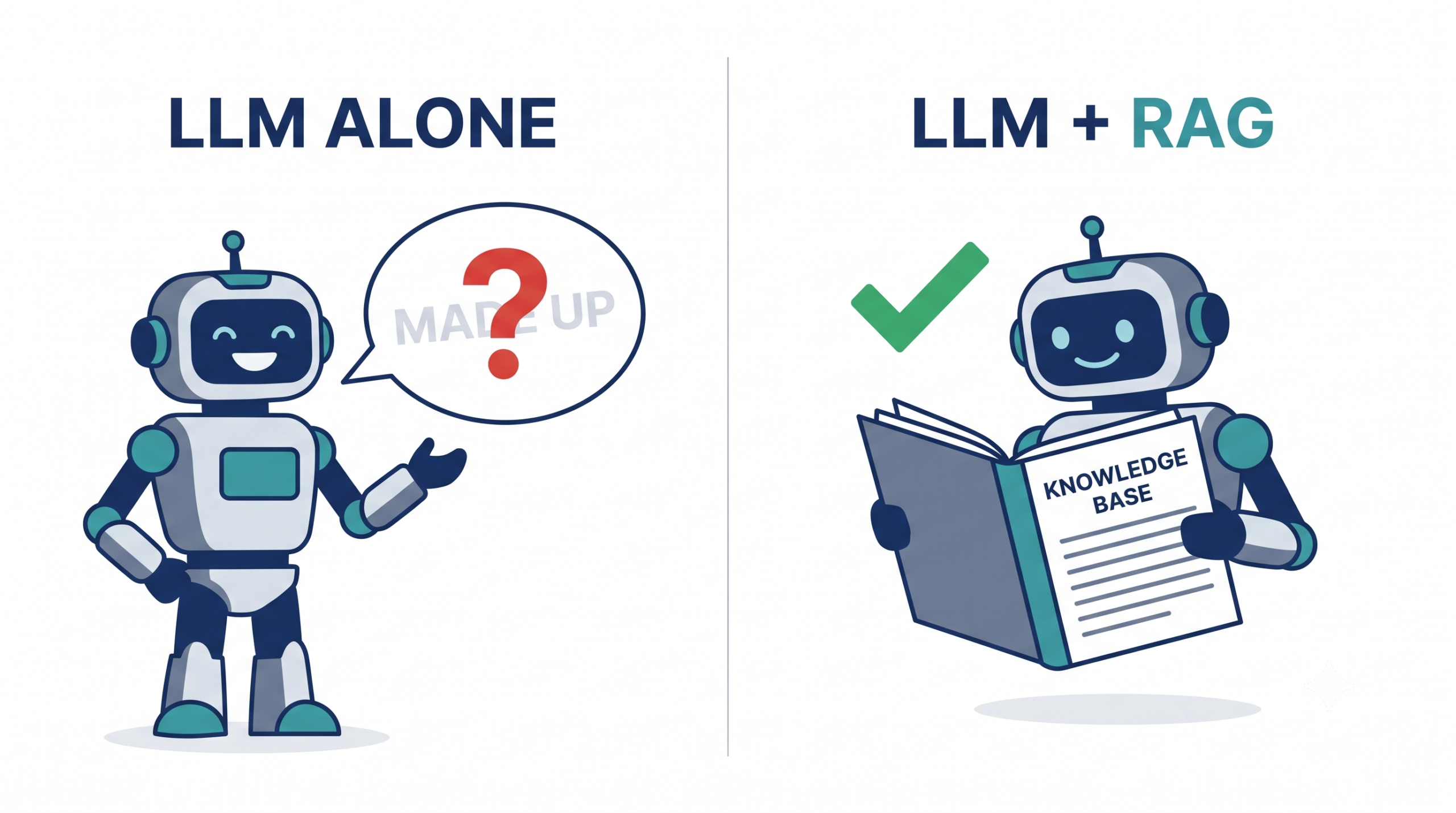
There’s just one problem: Nimbus’s refund policy is 14 days, not 30. The model made it up. It has never seen your policy — it’s pattern-matching against the millions of refund policies it read during training, and it guessed. The answer sounds right, which is exactly what makes it dangerous.
This is the wall every developer hits when they try to build something real on top of an LLM. The model is fluent, but it doesn’t know your data — your docs, your policies, your product. And when it doesn’t know, it doesn’t stay silent. It invents. We call that hallucination, and in a support bot it’s the difference between helping a customer and misleading one.
Over this series we’ll build Nimbus HelpDesk AI: a support bot that answers strictly from Nimbus’s real knowledge base, cites the article it used, and honestly says “I don’t know” when the answer isn’t there. The technique that makes this possible is RAG. This first episode is about understanding it. Then we build.
What RAG actually is
RAG stands for Retrieval-Augmented Generation. Strip away the jargon and it’s a simple idea:
Before you ask the model to answer, go find the relevant information and hand it to the model along with the question.
That’s it. Instead of hoping the model remembers Nimbus’s refund policy from training (it doesn’t), you retrieve the actual policy text from your own documents and paste it into the prompt. The model then answers using the text you gave it, not its fuzzy memory.
Three words, three jobs:
- Retrieval — search your knowledge base and pull out the few chunks of text most relevant to the question.
- Augmented — take those chunks and add them to the prompt as context.
- Generation — let the LLM write the final answer, grounded in that context.
The mental model that helps most: an LLM on its own is a brilliant intern answering from memory with the office locked. RAG is the same intern, but now they can walk to the filing cabinet, pull the exact document, and answer with it open on the desk. Same intelligence — dramatically more reliable, because the facts come from your cabinet instead of their recollection.
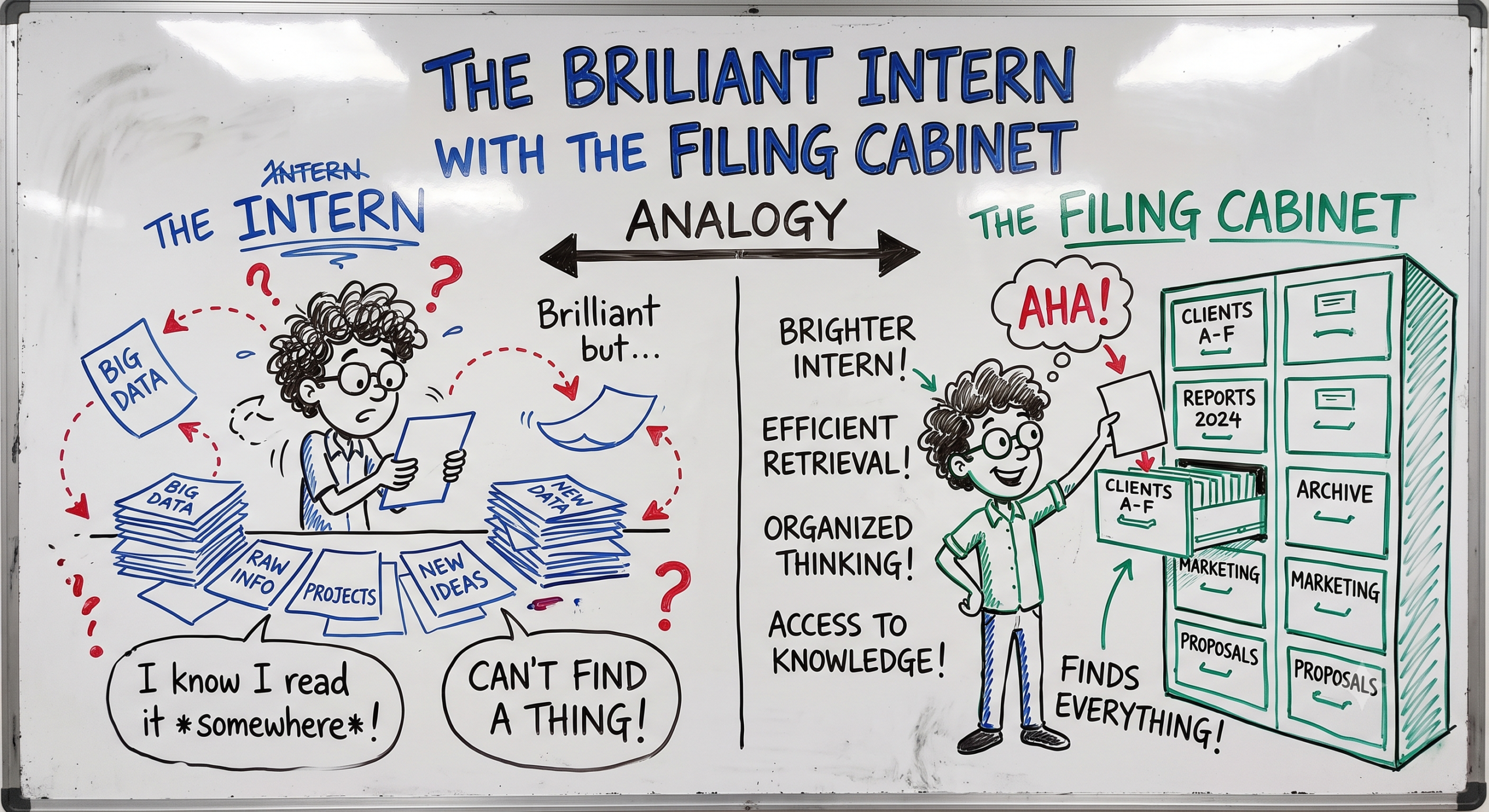
💡 Tip: RAG doesn’t make the model “smarter.” It changes where the facts come from — from the model’s frozen training data to your live documents. That’s why RAG is how you get an LLM to answer about data it was never trained on, including data that changes daily.
The two-phase architecture
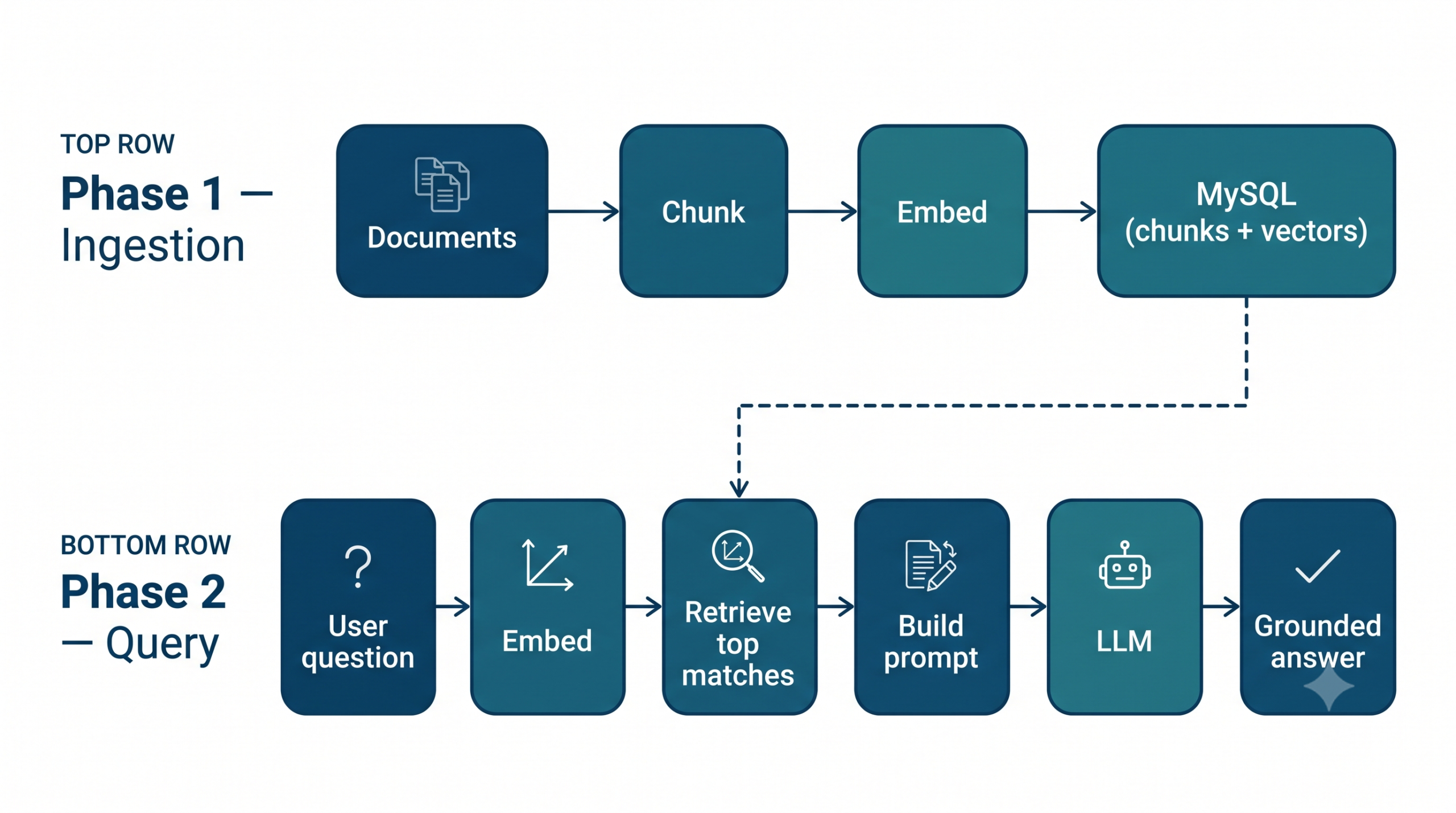
Every RAG system, no matter how fancy, has two phases. Keep these separate in your head and the whole series will click.
Phase 1 — Ingestion (done ahead of time, offline)
You prepare your knowledge base once (and re-run it whenever your docs change):
- Load your documents — Nimbus’s FAQ, help articles, refund policy, feature docs.
- Chunk them — split long documents into small, searchable passages.
- Embed each chunk — turn the text into a list of numbers (a vector) that captures its meaning.
- Store the chunks and their vectors — for us, in a MySQL table.
Think of this as building the library and its index before anyone walks in.
Phase 2 — Query (happens live, per question)
When a customer actually asks something:
- Embed the question — same trick, turn it into a vector.
- Retrieve — find the stored chunks whose vectors are closest in meaning to the question.
- Augment — build a prompt: system instructions + the retrieved chunks + the question.
- Generate — send it to the LLM and return a grounded, cited answer.
The magic that connects the two phases is the embedding — the same process turns both your documents and the incoming question into numbers, so “closeness in meaning” becomes something a computer can measure. We’ll demystify embeddings completely in Episode 3. For now, just hold the shape of the system.
Let’s make it concrete (a little code)
We won’t build the real pipeline yet — that starts next episode. But to feel the core idea of RAG, let’s do the last step by hand: give the model some context and watch it answer from that context instead of its imagination.
Project setup
Create the project folder and structure. Throughout this series the repo has one folder per episode, so this is episode-01/:
nimbus-helpdesk/
└── episode-01/
    ├── .env
    ├── config.php
    └── ask.php
We’ll keep dependencies minimal. You need PHP 8+ and cURL (bundled with most PHP installs). Create a .env file for your API key — never hardcode secrets:
# .env
OPENAI_API_KEY=sk-your-key-here
OPENAI_CHAT_MODEL=gpt-4o-mini
A tiny config loader so we don’t repeat ourselves later:
<?php
// config.php — loads .env into getenv()-style access

function env(string $key, ?string $default = null): ?string {
    static $vars = null;
    if ($vars === null) {
        $vars = [];
        $path = __DIR__ . '/.env';
        if (is_file($path)) {
            foreach (file($path, FILE_IGNORE_NEW_LINES | FILE_SKIP_EMPTY_LINES) as $line) {
                if (str_starts_with(trim($line), '#')) continue;
                [$k, $v] = array_pad(explode('=', $line, 2), 2, '');
                $vars[trim($k)] = trim($v);
            }
        }
    }
    return $vars[$key] ?? $default;
}
A first grounded call
Now the interesting part. We’ll send the LLM a question plus a hardcoded snippet of Nimbus’s real policy, and instruct it to answer only from that snippet. This is RAG with the retrieval step faked — we’re pretending we already found the right chunk.
<?php
// ask.php — a single grounded LLM call (retrieval faked for now)

require __DIR__ . '/config.php';

// This is the "context" a real retriever would fetch for us in later episodes.
$context = <<<TXT
Nimbus Refund Policy (v3):
Customers may request a full refund within 14 days of purchase.
Refunds are issued to the original payment method within 5–7 business days.
Duplicate charges are always refunded in full, regardless of the 14-day window.
TXT;

$question = "I was charged twice this month. Can I get a refund?";

$systemPrompt = <<<TXT
You are Nimbus HelpDesk AI, a support assistant.
Answer the user's question using ONLY the context provided below.
If the answer is not in the context, say you don't know and suggest contacting support.
Do not invent policies, numbers, or timeframes.

Context:
$context
TXT;

$payload = [
    'model' => env('OPENAI_CHAT_MODEL', 'gpt-4o-mini'),
    'messages' => [
        ['role' => 'system', 'content' => $systemPrompt],
        ['role' => 'user',   'content' => $question],
    ],
    'temperature' => 0.2,
];

$ch = curl_init('https://api.openai.com/v1/chat/completions');
curl_setopt_array($ch, [
    CURLOPT_RETURNTRANSFER => true,
    CURLOPT_HTTPHEADER => [
        'Content-Type: application/json',
        'Authorization: Bearer ' . env('OPENAI_API_KEY'),
    ],
    CURLOPT_POSTFIELDS => json_encode($payload),
]);

$response = curl_exec($ch);
if ($response === false) {
    exit('Request failed: ' . curl_error($ch));
}
curl_close($ch);

$data = json_decode($response, true);
echo $data['choices'][0]['message']['content'] ?? 'No answer returned.';
Run it:
php episode-01/ask.php
You’ll get something like:
“Yes — duplicate charges are always refunded in full, even outside the standard 14-day window. The refund goes back to your original payment method within 5–7 business days.”
Every fact in that answer — 14 days, 5–7 business days, the duplicate-charge exception — came from our context, not the model’s memory. That’s the whole point of RAG in one sentence.
💡 What is
temperature? It’s a setting between 0 and 2 that controls how creative versus predictable the model’s answers are. Think of it as a “randomness dial.” A high temperature (say 1.0+) makes the model more adventurous and varied — great for brainstorming or writing a poem, where you want surprise. A low temperature (near 0) makes it focused and repetitive — it picks the safest, most likely words. For a support bot answering factual questions, you want it boring and reliable, not imaginative, so we set it low (0.2). The same question will give nearly the same answer every time, and the model is far less likely to “improvise” facts beyond your context. We’ll revisit this in the generation episode.
Prompt spotlight
The system prompt above is doing quiet but critical work, and it previews a pattern we’ll return to constantly:
Answer the user's question using ONLY the context provided below.
If the answer is not in the context, say you don't know...
Do not invent policies, numbers, or timeframes.
Three instructions, three defenses:
- “using ONLY the context” anchors the model to your facts instead of its training data. This single line is what converts a chatty LLM into a grounded one.
- “say you don’t know” gives it permission to fail safely. Without this, models tend to guess rather than admit ignorance — and a confident wrong answer is the worst outcome for support.
- “Do not invent… numbers or timeframes” targets the exact thing models fudge most: specifics like “30 days” or “5–7 days.”
We faked retrieval here by pasting the context in ourselves. In a real system, that $context variable gets filled automatically by searching your knowledge base — and building that search is what the next several episodes are about.
Try it yourself
Before moving on, get hands-on:
- Break the grounding. Change the policy in
$contextto say refunds are within 60 days. Re-run. The answer should now say 60 — proof the model is genuinely reading your context, not its memory. - Test the “I don’t know” path. Ask something the context can’t answer, like “Do you offer a student discount?” A well-grounded bot should decline rather than invent a discount.
- Remove the context entirely (delete the
Context:block from the system prompt) and ask the refund question again. Watch it confidently hallucinate a policy. That contrast — with context vs. without — is the entire case for RAG.
Recap & what’s next
What you should walk away with:
- LLMs don’t know your data and will confidently make things up (hallucinate) when asked about it.
- RAG fixes this by retrieving your real information and handing it to the model as context, so answers come from your documents, not the model’s memory.
- Every RAG system has two phases: offline ingestion (load → chunk → embed → store) and live query (embed question → retrieve → augment → generate).
- A tight system prompt — “answer only from the context, say I don’t know otherwise” — is what keeps the model grounded and honest.
Right now we’re faking the retrieval by pasting context in by hand. That doesn’t scale past one hardcoded snippet. So in Episode 2 — Preparing the Knowledge Base, we’ll take Nimbus’s real documents (Markdown and PDF), clean them up, and split them into the bite-sized chunks that everything else depends on. The library needs books before it needs an index.