The gap we have to close
At the end of Episode 2 we had chunks.json: our documents sliced into clean, tagged passages. But those chunks are still just text, and text has a frustrating limitation for search.
A customer might ask: “How do I get my money back?” The relevant chunk says: “Customers may request a full refund within 14 days.” You and I instantly see these are about the same thing — but they don’t share a single important word. “Money back” ≠ “refund”. A traditional keyword search would find nothing.
To build a bot that understands meaning rather than matching words, we need a way to measure how similar in meaning two pieces of text are. That’s exactly what embeddings give us — and they’re the “R” (retrieval) that RAG is named for. This episode is where the system stops shuffling text and starts understanding it.
What is an embedding?
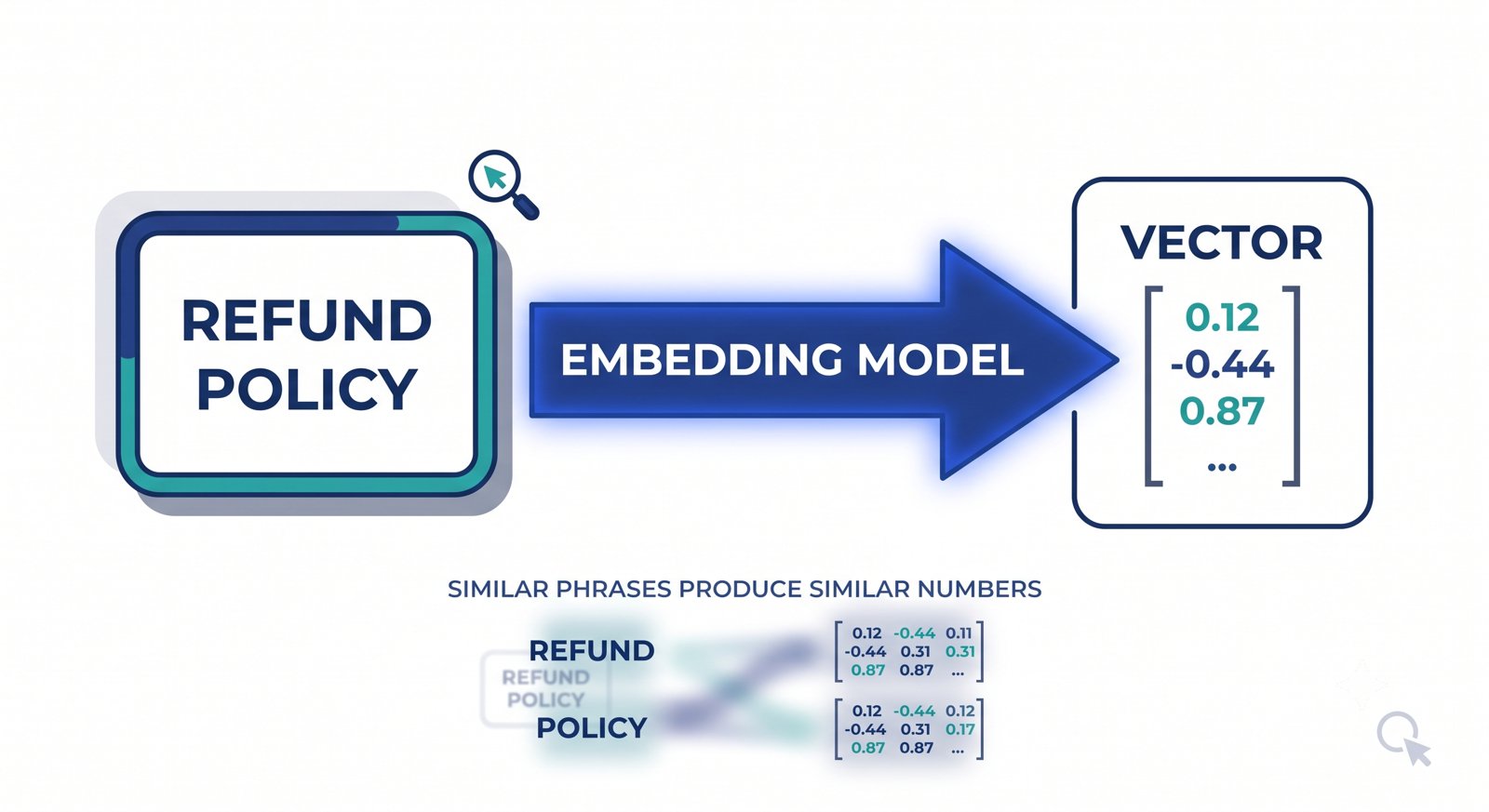
An embedding is a list of numbers that represents the meaning of a piece of text. You feed text to an embedding model, and it returns a long list of numbers — for the model we’ll use, exactly 1,536 numbers for any input.
That list is called a vector. Don’t let the word scare you — a vector is just an ordered list of numbers, like [0.12, -0.44, 0.87, ...]. Each number captures some tiny, abstract aspect of the text’s meaning (we don’t know exactly what each one means, and we don’t need to).
Here’s the key property that makes this useful:
Texts with similar meanings produce similar vectors. Texts with different meanings produce different vectors.
So “how do I get my money back?” and “refund policy” — different words, same idea — end up with vectors that are close together, even though they share no keywords. That closeness is something a computer can measure. Keyword search asks “do these share the same letters?” Embeddings let us ask “do these mean the same thing?”
An analogy: a map of meaning
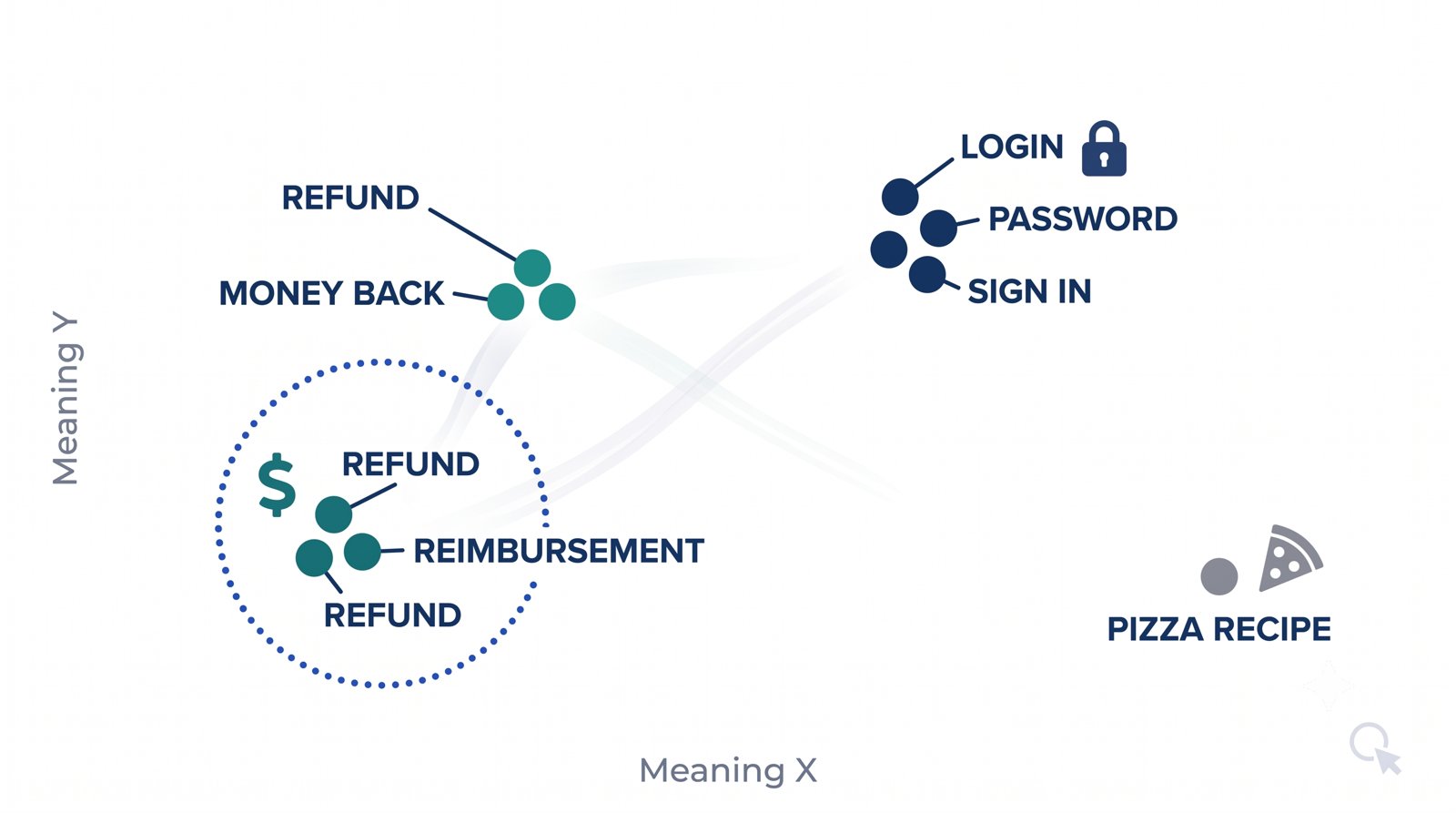
Picture a giant map where every possible phrase is a dot. On this map, dots are placed by meaning, not spelling. “Refund,” “money back,” and “reimbursement” all land in the same neighborhood. “Refund” and “pizza recipe” land on opposite sides of town.
An embedding is simply the coordinates of a phrase on that map. Our map has 1,536 dimensions instead of 2 (which is impossible to picture, so don’t try) — but the intuition holds perfectly: to find text that means the same thing, look for coordinates that are close together.
💡 New terms: A vector = an ordered list of numbers. A dimension = one number’s slot in that list. Our embeddings are “1,536-dimensional,” meaning each is a list of 1,536 numbers. More dimensions let the model capture more subtle shades of meaning.
Measuring closeness: cosine similarity
If embeddings are coordinates, we need a way to measure the distance between two of them. The standard tool in RAG is cosine similarity.
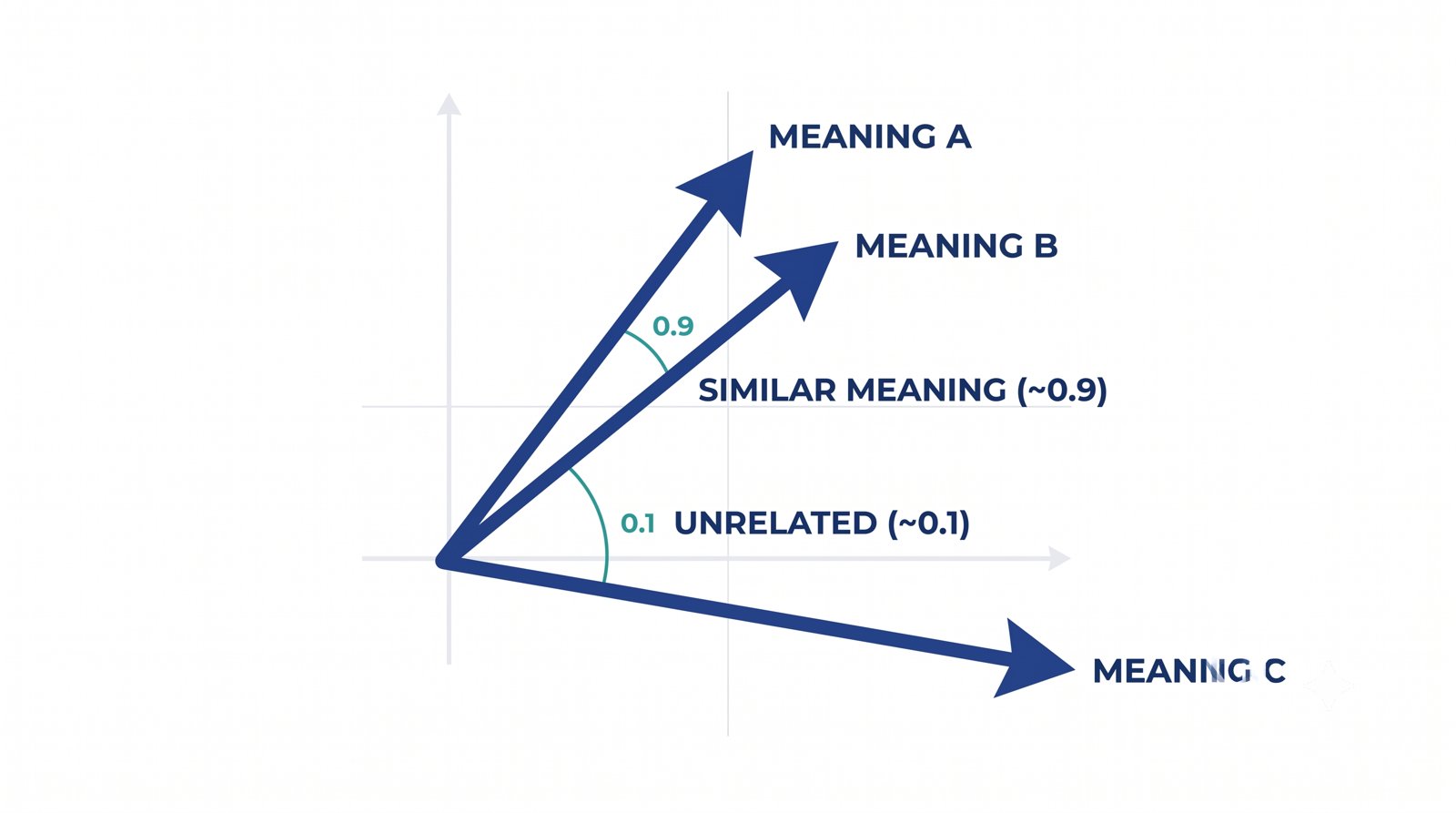
Here’s the beginner version. Picture each vector as an arrow pointing out from the center of our map. Cosine similarity measures the angle between two arrows:
- Arrows pointing in nearly the same direction (small angle) → very similar meaning → score near 1.0.
- Arrows at right angles → unrelated → score near 0.
- Arrows pointing opposite ways → opposite meaning → score near -1.
So we don’t care how long the arrows are, only whether they point the same way. In practice, for our support bot, a question and its best-matching chunk might score around 0.5–0.8, while an unrelated chunk scores near 0.1. We rank chunks by this score and take the highest — that’s retrieval in a nutshell.
The formula looks intimidating but it’s three simple sums, and we’ll write it in plain PHP so you can watch it work.
Building it in PHP + MySQL
Time to make it real. This episode’s folder is episode-03/. Copy your chunks.json from Episode 2 into it — that’s our input.
nimbus-helpdesk/
└── episode-03/
    ├── .env
    ├── config.php        (from Episode 1)
    ├── db.php            (new — MySQL connection)
    ├── embed.php         (new — call the embedding API)
    ├── build-index.php   (embed all chunks → MySQL)
    ├── search.php        (embed a question → rank chunks)
    └── chunks.json       (copied from Episode 2)
Step 1 — The database
We’ll store each chunk and its embedding in a MySQL table. MySQL 8 has no dedicated “vector” column, so we store the vector in a JSON column — perfectly fine for a knowledge base this size. Create the database and table:
CREATE DATABASE IF NOT EXISTS nimbus CHARACTER SET utf8mb4;

USE nimbus;

CREATE TABLE chunks (
    id          INT AUTO_INCREMENT PRIMARY KEY,
    source      VARCHAR(255),
    title       VARCHAR(255),
    chunk_index INT,
    content     TEXT,
    embedding   JSON,
    created_at  TIMESTAMP DEFAULT CURRENT_TIMESTAMP
);
Add your database credentials to .env (alongside the API key from Episode 1):
OPENAI_API_KEY=sk-your-key-here
OPENAI_EMBED_MODEL=text-embedding-3-small

DB_HOST=127.0.0.1
DB_NAME=nimbus
DB_USER=root
DB_PASS=
A small connection helper using PDO (PHP’s standard, safe database layer):
<?php
// db.php — a single reusable MySQL connection
require __DIR__ . '/config.php';

function db(): PDO {
    static $pdo = null;
    if ($pdo === null) {
        $dsn = 'mysql:host=' . env('DB_HOST', '127.0.0.1')
             . ';dbname='   . env('DB_NAME')
             . ';charset=utf8mb4';
        $pdo = new PDO($dsn, env('DB_USER'), env('DB_PASS'), [
            PDO::ATTR_ERRMODE            => PDO::ERRMODE_EXCEPTION,
            PDO::ATTR_DEFAULT_FETCH_MODE => PDO::FETCH_ASSOC,
        ]);
    }
    return $pdo;
}
Step 2 — Generating an embedding
One function, one job: send text to the embedding API, get back the vector. Same cURL pattern as our Episode 1 chat call, different endpoint.
<?php
// embed.php — turn a string into an embedding vector
require __DIR__ . '/config.php';

function getEmbedding(string $text): array {
    $payload = [
        'model' => env('OPENAI_EMBED_MODEL', 'text-embedding-3-small'),
        'input' => $text,
    ];

    $ch = curl_init('https://api.openai.com/v1/embeddings');
    curl_setopt_array($ch, [
        CURLOPT_RETURNTRANSFER => true,
        CURLOPT_HTTPHEADER => [
            'Content-Type: application/json',
            'Authorization: Bearer ' . env('OPENAI_API_KEY'),
        ],
        CURLOPT_POSTFIELDS => json_encode($payload),
    ]);

    $response = curl_exec($ch);
    if ($response === false) {
        throw new RuntimeException('Embedding request failed: ' . curl_error($ch));
    }
    curl_close($ch);

    $data = json_decode($response, true);
    return $data['data'][0]['embedding']
        ?? throw new RuntimeException('No embedding returned: ' . $response);
}
Step 3 — Building the index
Now we read chunks.json, embed every chunk, and store it. This is the “E” and “store” from Phase 1 — done once, offline.
<?php
// build-index.php — embed all chunks and store them in MySQL
require __DIR__ . '/db.php';
require __DIR__ . '/embed.php';

$chunks = json_decode(file_get_contents(__DIR__ . '/chunks.json'), true);
$pdo    = db();

// Start clean so re-runs don't create duplicates
$pdo->exec('TRUNCATE TABLE chunks');

$stmt = $pdo->prepare(
    'INSERT INTO chunks (source, title, chunk_index, content, embedding)
     VALUES (?, ?, ?, ?, ?)'
);

$total = count($chunks);
foreach ($chunks as $n => $c) {
    $embedding = getEmbedding($c['content']);
    $stmt->execute([
        $c['source'],
        $c['title'],
        $c['chunk_index'],
        $c['content'],
        json_encode($embedding),
    ]);
    echo "Embedded " . ($n + 1) . "/$total\r";
}

echo "\nDone. Stored $total chunks with embeddings.\n";
Run it:
php episode-03/build-index.php
Each chunk now lives in MySQL with its 1,536-number vector attached. Your knowledge base is officially searchable by meaning.
⚠️ Gotcha: Every call to the embedding API costs a fraction of a cent and takes a moment. For 18 chunks that’s nothing, but for thousands you’d batch them and avoid re-embedding unchanged chunks. We keep it one-at-a-time here for clarity.
Step 4 — The first search
The moment of truth. We embed the customer’s question the exact same way, compare it against every stored chunk with cosine similarity, and print the closest matches.
<?php
// search.php — find the chunks closest in meaning to a question
require __DIR__ . '/db.php';
require __DIR__ . '/embed.php';

function cosineSimilarity(array $a, array $b): float {
    $dot = $normA = $normB = 0.0;
    foreach ($a as $i => $v) {
        $dot   += $v * $b[$i];
        $normA += $v * $v;
        $normB += $b[$i] * $b[$i];
    }
    return $dot / (sqrt($normA) * sqrt($normB) + 1e-10);
}

$question = $argv[1] ?? 'How do I get my money back?';
$queryVec = getEmbedding($question);

$rows   = db()->query('SELECT source, content, embedding FROM chunks')->fetchAll();
$scored = [];

foreach ($rows as $row) {
    $vec      = json_decode($row['embedding'], true);
    $scored[] = ['score' => cosineSimilarity($queryVec, $vec), 'row' => $row];
}

// Highest score first
usort($scored, fn($a, $b) => $b['score'] <=> $a['score']);

echo "Question: $question\n\n";
foreach (array_slice($scored, 0, 3) as $i => $s) {
    printf("#%d  score=%.3f  [%s]\n%s\n\n",
        $i + 1,
        $s['score'],
        $s['row']['source'],
        mb_substr($s['row']['content'], 0, 160) . '…'
    );
}
Run it with the tricky, no-shared-keywords question:
php episode-03/search.php "How do I get my money back?"
And the payoff:
Question: How do I get my money back?

#1  score=0.612  [refund-policy.md]
Customers may request a full refund within 14 days of purchase. Refunds are issued to the original payment method within 5–7 business days…

#2  score=0.401  [faq.md]
If you were billed twice for the same subscription, contact support and we will reverse the extra charge…

#3  score=0.233  [getting-started.md]
Create your Nimbus account by clicking Sign Up in the top-right…
Look at what happened. The word “refund” never appeared in the question, yet the refund policy came back as the top match — because embeddings matched on meaning, not spelling. That is retrieval working. Everything else in this series builds on this single capability.
Try it yourself
- Test the semantic magic. Try questions that avoid the obvious keywords: “I was charged for something I didn’t want”, “can I cancel and be reimbursed?” Watch the right chunks surface anyway.
- Watch the scores. Ask something totally off-topic like “what’s the weather today?” Notice every score drops low — a signal we’ll use later to make the bot say “I don’t know.”
- Compare two phrasings. Embed “reset my password” and “I forgot my login” and eyeball their top matches. Same neighborhood on the map of meaning.
Recap & what’s next
- An embedding turns text into a vector — a list of numbers (1,536 of them) that captures meaning.
- Similar meanings → similar vectors, so we can match “money back” to “refund” with zero shared keywords.
- Cosine similarity scores how closely two vectors point in the same direction (1 = same meaning, 0 = unrelated).
- We stored embeddings in a MySQL JSON column and computed similarity in PHP, so you can see exactly how retrieval works under the hood.
There’s one problem with what we just built: search.php pulls every chunk out of MySQL and loops over them in PHP. With 18 chunks that’s instant — with 50,000 it would crawl. In Episode 4 — Scaling the Vector Search in MySQL, we’ll push the similarity math down into SQL so the database does the heavy lifting, tidy up the schema, and see how this approach grows (plus a peek at MySQL 9’s native vector features for when you’re ready). Same results, built to scale.